We tracked a tagged visit through to a Stripe sandbox payment by keeping the visitor ID from arrival through checkout and matching the payment event. To do the same for ChatGPT traffic, record the utm_source=chatgpt.com tag or chatgpt.com referrer when someone arrives. I would treat the result as a partial view: visits without a tag or referrer cannot reliably be identified later.
Key takeaways
- Check for
utm_source=chatgpt.comon the landing URL and look forchatgpt.comin the referrer. - GA4 now has an AI Assistant channel, but it only shows revenue if you send purchase events.
- Clicks with no tag and no referrer land in Direct, so treat your ChatGPT number as a minimum.
- In our Stripe sandbox test, a tagged visit carried through to a $9.00 payment credited to chatgpt.com.
How does ChatGPT traffic appear in analytics?
A ChatGPT click can arrive in one of three ways, and each one needs different handling.
If a ChatGPT Search answer links to your site, open that link and check the landing URL for utm_source=chatgpt.com. If your site redirects visitors before analytics runs, check that the tag is still present on the final URL. Analytics can only use the signals it receives.
| What arrives | How to identify it | Usual result |
|---|---|---|
| Tag, with or without a referrer | utm_source=chatgpt.com |
Identifiable as ChatGPT |
| Referrer only | Referrer host is chatgpt.com or the older chat.openai.com | Identifiable as ChatGPT |
| Neither | Nothing to read | Reported as Direct |
A bare URL copied from an answer can arrive without either signal. Keep those visits in Direct when reviewing ChatGPT traffic.
Can GA4 do this without another tool?
Yes, if GA4 already receives purchase events with a value and currency.
Google’s default channel documentation lists an AI Assistant channel, using the medium ai-assistant when the referrer matches its list of assistants. Default channel groups cannot be edited, though you can create a custom one. The same page says the channel excludes AI Overviews and AI Mode, which stay in Organic Search.
- Open Reports → Acquisition → Traffic acquisition and switch the primary dimension to Session source. Look for
chatgpt.comand check Sessions and Total revenue on that row. The AI Assistant channel combines multiple sources. - Run a test purchase after opening a tagged link. For a browser-tagged checkout, use DebugView to confirm the
purchaseevent carries the expectedtransaction_id,valueandcurrency. Follow Google’s purchase event setup guide to verify those fields. - Once the test is available in reports, check which session source gets the revenue. If the purchase appears under another source, trace the checkout handoff and the return to your site. If the purchase event is missing, start with the checkout integration.
The Traffic acquisition report documentation explains how session attribution differs from User acquisition, which groups users by their first source.
How do you connect ChatGPT visits to payments?
Record the source once, keep it with a visitor ID, and let the payment provider return that ID.
I’ll use Grosslytics for these steps, but the same four-part method applies to other analytics tools.
1. Install the tracker on the pages people land on.
<script defer src="https://grosslytics.com/g.js"
  data-site-id="YOUR_SITE_ID"></script>
See the installation guide for self-hosting and Content Security Policy settings.
2. Check the source is recognised. Open a page with the tag in a private window, then find that visit in your report:
https://your-site.example/?utm_source=chatgpt.com
Grosslytics groups tagged or referred visits from ChatGPT, Perplexity, Claude, Gemini and Copilot under AI Search.
3. Carry the visitor into checkout. Grosslytics adds the visitor ID to supported Stripe Payment Links as client_reference_id, which Stripe returns in the checkout.session.completed event. For checkouts created on your server, follow the Stripe revenue guide. Polar, Dodo Payments and Lemon Squeezy have their own fields.
4. Send signed payment webhooks to your analytics endpoint, as described in the payments reference. If the tagged visit appears but the sale gets no source credit, check that Stripe received the same visitor ID in client_reference_id and that the signed checkout.session.completed event reached Grosslytics.
What happened when we tested it?
One tagged visit became one correctly credited sandbox payment.
We ran this on November 9, 2026, on a local copy of Grosslytics in a real browser, using a Stripe sandbox and Stripe’s published test card. We typed the tagged URL ourselves. It was not a click from ChatGPT, no real money moved, and one run shows the mechanism works, not how ChatGPT traffic behaves.
| Stage | Observed result |
|---|---|
Landing with utm_source=chatgpt.com |
Accepted by the API and stored as source chatgpt.com |
| Channel stored | AI Search |
| Moving to the pricing page | Source stayed chatgpt.com |
| Checkout link | client_reference_id set to the visitor ID |
| Payment recorded | $9.00 gross, $0.56 estimated fee, $8.44 net |
| Credit | First touch and last touch both chatgpt.com |
The return from Stripe was recorded as a separate Direct (Shared Link) visit. It did not change the credit for this sale, but it can become the last touch for a later purchase by the same person, so first-touch reports are the safer read here.
How should you read the report?
Compare net revenue per visitor by source, and look at first and last touch separately.
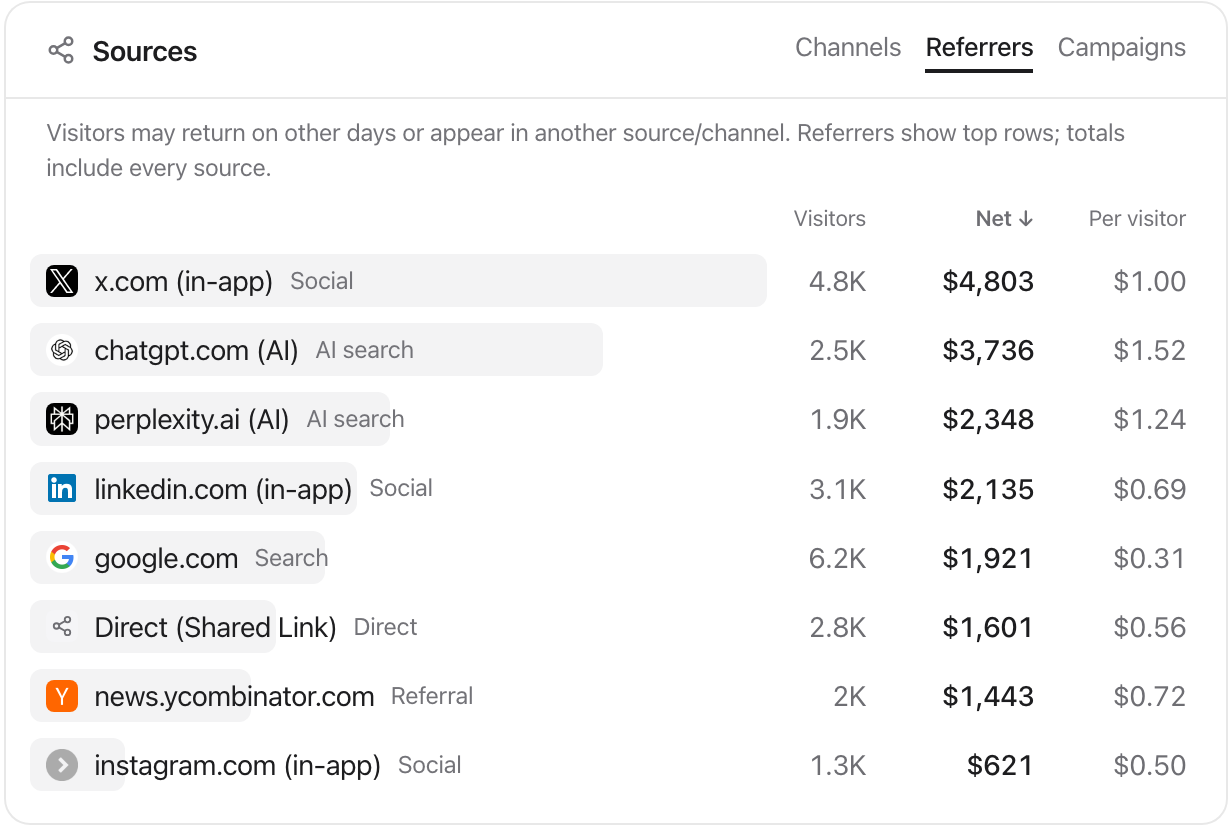
First touch shows whether ChatGPT was the buyer’s first recorded source. Last touch shows whether it received credit for the payment under the latest recorded source. The dashboard definitions explain each model.
Use the same date range and attribution model when comparing sources. Keep the visitor and purchase counts alongside revenue per visitor so you can see when a single payment drives the result.
What can this method not tell you?
It cannot show the question someone asked, or recover a source that was never sent.
- Prompts: the visit carries no record of what the person asked ChatGPT.
- Direct traffic: clicks without a tag or referrer stay in Direct.
- Google’s AI answers: clicks from AI Overviews and AI Mode are counted within Search Console’s Web totals and look like Google traffic.
- Refunds: Grosslytics handles full Stripe refunds; partial refunds are not deducted.
- Fees: the fee is an estimate from a configured schedule, so reconcile it with your provider.
Next, open one tagged link on your own site and confirm it appears as AI Search before relying on the report.
Frequently asked questions
What does utm_source=chatgpt.com mean?
It is a campaign tag that identifies chatgpt.com as the source of the visit. Anyone can append the tag, which makes it useful for testing your setup.
Should I remove utm_source=chatgpt.com from my URLs?
Not before your analytics has read it. If a redirect strips the tag first, the visit can lose its source. Canonical tags can keep the parameter out of search results.
Why does ChatGPT traffic show as Direct?
The visit arrived with no tag and no referrer, for example from a copied link. No analytics tool can identify it after that.
Can I see which ChatGPT prompt led to a sale?
No. You can see the landing page and the payment, but not the prompt.