I recommend treating Polar, Dodo Payments and Lemon Squeezy as separate integrations when tracking revenue by channel. Each needs the visitor ID in its own checkout field and a verified payment event sent to the matching Grosslytics endpoint: reference_id for Polar links, metadata_visitor_id for supported Dodo links, and checkout[custom][visitor_id] for Lemon Squeezy links. I’ll walk through each path so you can connect the sale to its source.
Lemon Squeezy is winding down. It closed new store sign-ups on November 16, 2026, and says it will stop processing payments on March 31, 2027. The Lemon Squeezy instructions below are for existing stores. If you are moving to another provider, test the visitor ID handoff and the first renewal again with the new checkout. See Lemon Squeezy’s migration guide.
Key takeaways
- Install the tracker on the page where the visitor arrives; a checkout link shared directly from a social post skips that site visit.
- Use provider-specific fields and webhook event types rather than one shared custom-data parameter.
- Verify that the signed webhook creates a sale with the expected source. A successful delivery can still be ignored.
- Grosslytics subtracts reported tax and estimated fees, but renewal classification and refund coverage differ by provider.
What does channel attribution need from a Merchant of Record checkout?
It needs a recorded visit, an identifier that survives checkout and a verified payment event carrying that identifier.
The examples follow each provider’s documentation and the Grosslytics implementation. Before relying on them for live payments, run a test transaction and check the webhook payload you receive.
A Merchant of Record can handle tax collection and payment operations, but your analytics still needs a way to connect the transaction to a visit. It cannot discover the originating post or an exact AI search query if that source information was never supplied.
Step 1: How do you record the source before checkout?
Add the Grosslytics tracker to the landing page and use a tagged URL for links you control.
<script defer src="https://grosslytics.com/g.js"
  data-site-id="YOUR_SITE_ID"></script>
For a campaign link, send visitors to your own tracked page first:
https://your-site.example/pricing?utm_source=x&utm_medium=social&utm_campaign=launch-post-1
Use a distinct campaign value for each post you want to distinguish. Linking straight from a social post to the provider’s checkout does not create a Grosslytics visit on your website.
The installation reference covers self-hosted tracker domains and API routing. Read gl_vid after the tracker loads if your application creates checkout sessions programmatically.
Step 2: Which identity field should each provider receive?
Use the field expected by both the provider and the current Grosslytics extractor.
| Provider | Supported anchor-link field | Programmatic checkout field | Grosslytics reads from the event |
|---|---|---|---|
| Polar | reference_id on buy.polar.sh or polar.sh |
metadata.visitor_id |
data.metadata.visitor_id or data.metadata.reference_id |
| Dodo Payments | metadata_visitor_id on checkout.dodopayments.com |
metadata.visitor_id |
data.metadata.visitor_id |
| Lemon Squeezy | checkout[custom][visitor_id] on a lemonsqueezy.com subdomain |
checkout_data.custom.visitor_id |
meta.custom_data.visitor_id |
Grosslytics decorates supported anchor links if the relevant parameter is absent. JavaScript redirects and custom server-created sessions need explicit handling; an existing reference value is not overwritten.
Polar checkout links and sessions
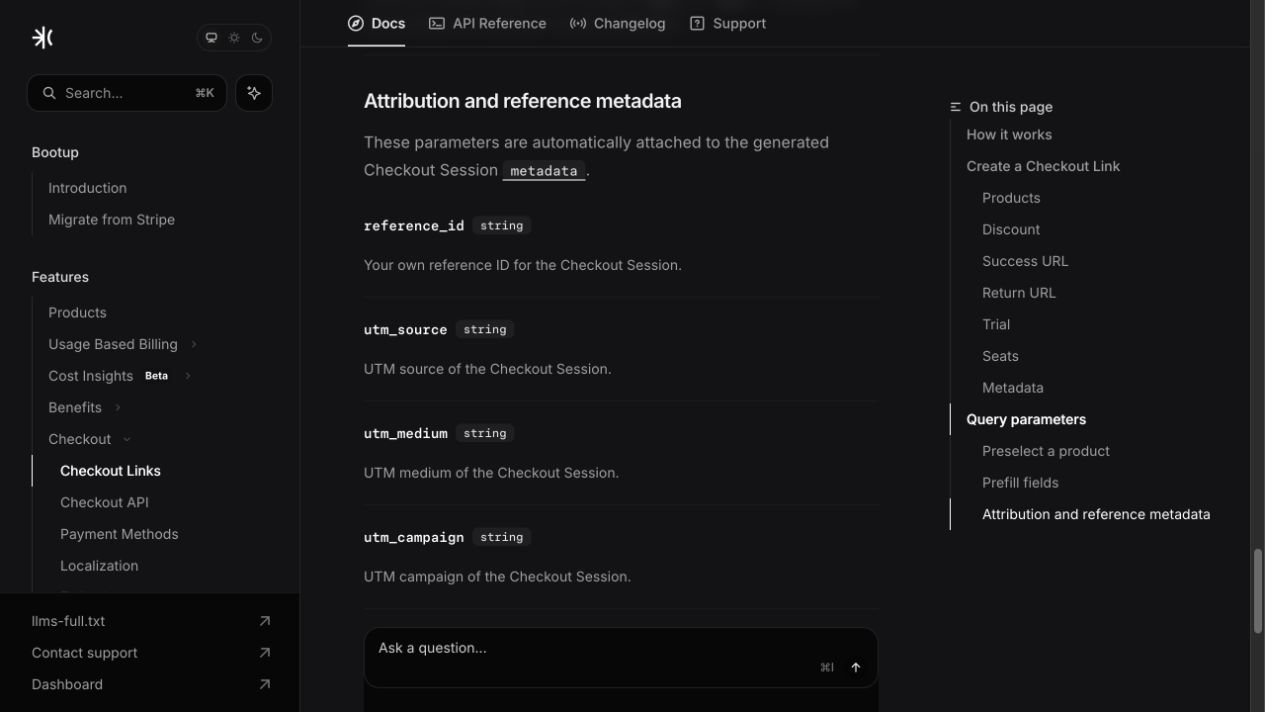
Polar documents reference_id as checkout-link metadata. Use the persistent Checkout Link rather than copying an expiring Checkout Session URL. Source: Polar Checkout Links.
If you already create sessions using the Polar server SDK, add a visitor metadata field to the validated checkout request:
// Server: polar is your initialized SDK client; body is a validated request.
const visitorId = typeof body.visitorId === 'string'
  && /^[A-Za-z0-9_-]{1,200}$/.test(body.visitorId)
  ? body.visitorId : null;

const checkout = await polar.checkouts.create({
  products: [process.env.POLAR_PRODUCT_ID],
  successUrl: 'https://your-site.example/thanks',
  metadata: visitorId ? { visitor_id: visitorId } : {}
});
// Return checkout.url through your application's response handler.
Confirm the installed SDK’s naming conventions and inspect the resulting order metadata. A successful checkout URL alone does not prove the order can be attributed.
Dodo Payments checkout sessions
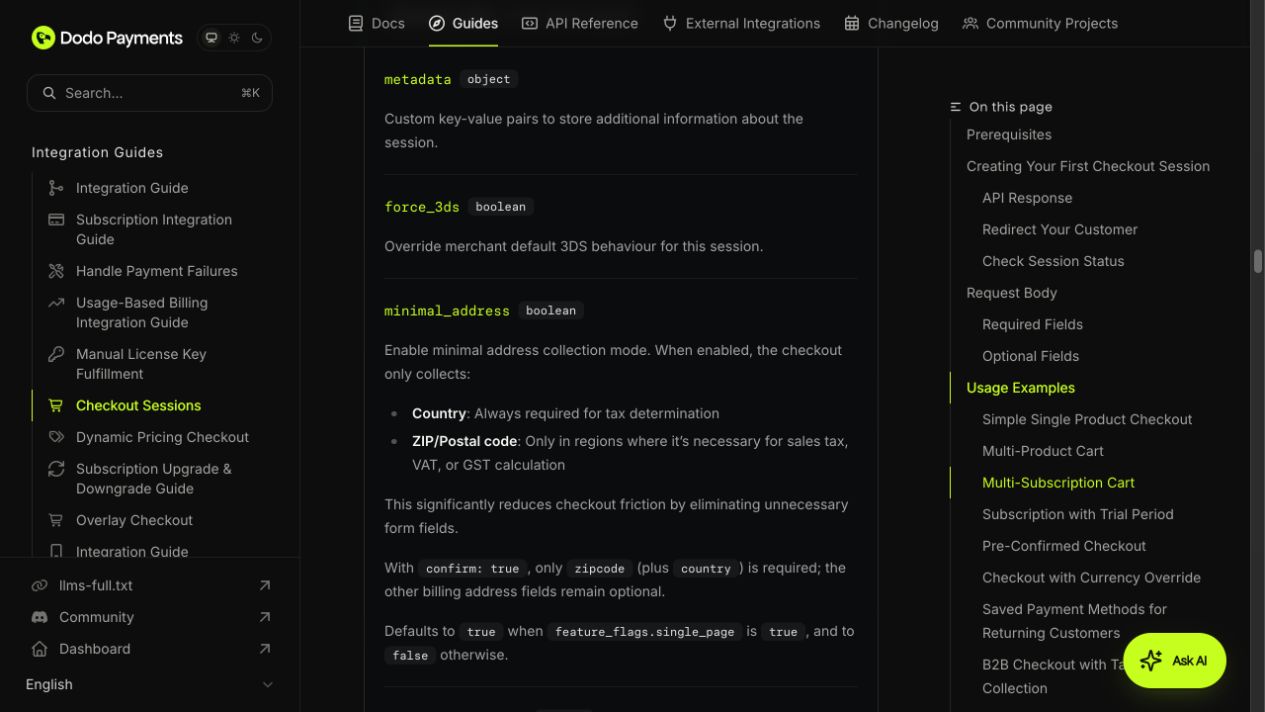
Dodo’s Checkout Sessions API accepts a metadata object; add visitor_id to your existing server request. Source: Dodo Checkout Sessions.
// Server: client is your initialized DodoPayments SDK client.
const visitorId = typeof body.visitorId === 'string'
  && /^[A-Za-z0-9_-]{1,200}$/.test(body.visitorId)
  ? body.visitorId : null;

const session = await client.checkoutSessions.create({
  product_cart: [{ product_id: process.env.DODO_PRODUCT_ID, quantity: 1 }],
  return_url: 'https://your-site.example/thanks',
  metadata: visitorId ? { visitor_id: visitorId } : {}
});
// Return session.checkout_url to your browser checkout handler.
The tracker has a separate metadata_visitor_id decoration path for supported Dodo anchor links. Verify the final payment metadata for the particular link or session flow you deploy; do not assume a field on a session automatically reached every later event.
Lemon Squeezy checkout links
Lemon Squeezy accepts checkout[custom] URL parameters and returns custom data in webhook meta.custom_data. A browser example using an existing hosted link is:
// Browser: run after the Grosslytics tracker has initialized.
let visitorId = null;
try { visitorId = localStorage.getItem('gl_vid'); } catch {}
const checkout = new URL('https://YOUR_STORE.lemonsqueezy.com/checkout/buy/YOUR_VARIANT');
if (visitorId) checkout.searchParams.set('checkout[custom][visitor_id]', visitorId);
window.location.assign(checkout.href);
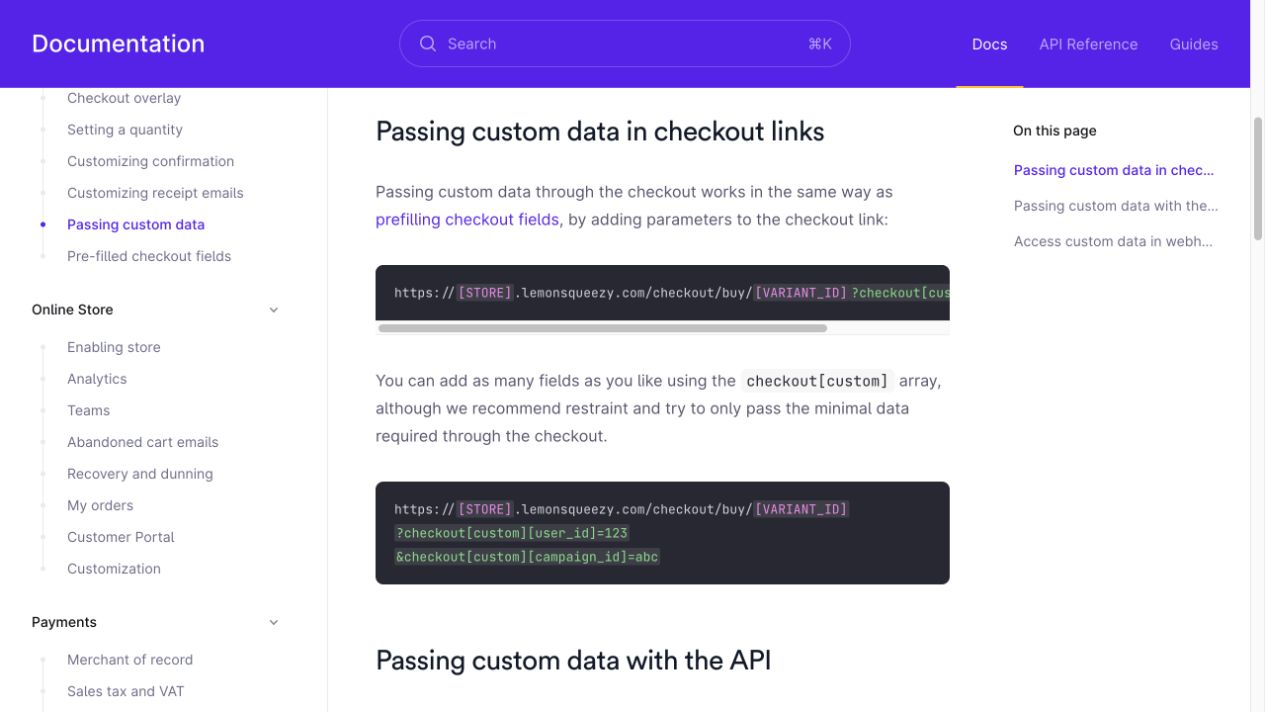
For an API-created link, put the value in checkout_data.custom.visitor_id. These are Lemon Squeezy-specific names, not the Polar or Dodo interface. Source: passing custom data.
Step 3: Which webhook events should reach Grosslytics?
Create a signed destination for each provider and save its signing secret in the matching Grosslytics Payments settings.
https://YOUR_ANALYTICS_DOMAIN/api/webhooks/polar?siteId=YOUR_SITE_ID
https://YOUR_ANALYTICS_DOMAIN/api/webhooks/dodo?siteId=YOUR_SITE_ID
https://YOUR_ANALYTICS_DOMAIN/api/webhooks/lemonsqueezy?siteId=YOUR_SITE_ID
| Provider | Payment events read by the current handler | Current refund behavior | Signature path |
|---|---|---|---|
| Polar | order.paid | Refund events not handled | Standard Webhooks headers |
| Dodo Payments | payment.succeeded | refund.succeeded handles explicitly full refunds; partial refunds ignored | Standard Webhooks headers |
| Lemon Squeezy | order_created, subscription_payment_success | Refund events not handled | X-Signature HMAC |
Use the payment integration reference to set each endpoint’s signing secret and reporting currency.
The signature must be checked against the unmodified request body. Lemon Squeezy documents its signature header in Signing Requests; a successful HTTP delivery is not by itself proof that the intended sale was attributed.
How do renewals and tax deductions differ across providers?
Renewal classification depends on the extractor’s recognized fields, while tax is removed only when the payment event supplies the expected tax amount.
Grosslytics marks a Polar payment as a renewal when billing_reason is subscription_cycle. Polar documents the billing reasons for new orders, renewals and prorations.
Lemon Squeezy’s subscription event sequence shows that the initial subscription payment can send both order_created and subscription_payment_success. Grosslytics reads the order and invoice as separate objects and marks the invoice as a renewal. If you enable both events, compare the first paid invoice and order against the recorded sales. Two analytics entries for one charge can inflate revenue and renewal counts.
The Dodo extractor currently marks every successful payment as a new sale, including recurring charges, so the new-versus-renewal customer counts will not be accurate.
Tax exclusion and fee deduction are also separate operations. In an illustrative $120 payment containing $20 tax, with an assumed $6 fee, revenue after tax and fees is $94:
recorded_revenue_before_fees = 120 - 20 = 100
revenue_after_assumed_fee = 100 - 6 = 94
The configured gateway schedule estimates fees; it does not read the exact settlement cost for these three providers. A missing tax field cannot be repaired by assuming all payments have the same tax rate.
What did the Grosslytics webhook tests verify?
On November 21, 2026, we ran the repository’s Polar and Dodo integration tests. Both passed. The tests sent signed sample events to the local app and checked the resulting payment records. No provider checkout was involved.
| Test | What the local app recorded |
|---|---|
Polar order.paid |
Matched data.metadata.reference_id to the seeded visitor and credited the sale to google.com. |
Dodo payment.succeeded |
Matched data.metadata.visitor_id and credited google.com. The sample showed $100 after tax and $95.20 after the estimated fee. Delivering the same payment again did not create another sale. |
Dodo refund.succeeded |
The partial refund left the sale in revenue. The full refund marked it refunded. |
How should you verify your first attributed sale?
Open a tagged landing page in a fresh browser session, complete a provider test payment, and compare its ID, amount, currency and source with the Grosslytics sale. Repeat with a renewal and refund if they affect your reporting.
| What you see | Where to check |
|---|---|
| The sale appears as Unattributed | Compare the browser’s gl_vid with the visitor field in the payment event. If the field is missing, inspect the checkout handoff. |
The endpoint returns 401 |
Verify that the endpoint and the Grosslytics site use the same signing secret. |
The endpoint returns 422 |
Check that the payment currency matches the site’s reporting currency. Grosslytics does not convert it. |
The endpoint returns 200, but no new sale appears |
Inspect the response body. ignored indicates the event did not produce a payment record. deduplicated indicates the event or payment was already processed. |
Use the dashboard definitions to reconcile the attributed source, tax and estimated fees against the payment provider. For the distinction between a tagged visit and the resulting payment, see the Stripe sandbox example.
Frequently asked questions
Can I use checkout[custom][visitor_id] for Polar and Dodo too?
No. That field belongs to Lemon Squeezy checkout links. Polar links use reference_id, while supported Dodo links use metadata_visitor_id; programmatic sessions use provider-specific metadata objects.
Are these read-only webhooks?
No. They are inbound event deliveries that update the Grosslytics payment ledger after signature verification. They are different from a read-only API credential.
Does Grosslytics classify Dodo subscription renewals correctly?
The current Dodo extractor records successful payments but marks them as new sales. Subscription-aware renewal classification is not implemented in this version.
Do all three providers have automatic refund accounting?
No. The current Dodo path handles explicitly full refunds; partial Dodo refunds and Polar or Lemon Squeezy refund events are not automatically reflected by these handlers.